
Allied Vision PlainsboroHelping to Prevent Eye Strain in the Virtual Classroom
The COVID pandemic has upended and disrupted lives in ways we could not have imagined. While most adults work from home, children and young adults continue to attend school—albeit virtually. Between smartphones, tablets and computers, your kids are likely spending 6 to 10 hours a day looking at screens.

5 TOP TIPS
Remote learning may cause eye strain, characterized by headaches, blurry vision, dry or itchy eyes, and even double vision. Make sure your child is practicing good eye care now in order to prevent any long-term eye damage.

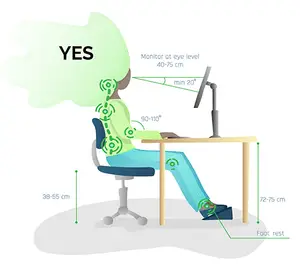
Reposition the monitor.
Computer screens should be situated 20-30 inches away from the eyes and no more than 4-5 inches below eye level. Make sure to position the computer so that the top is just below eye level.

Rest the eyes.
For every 2 hours spent staring at a screen, have your kid rest their eyes for 15 minutes by doing something else. The 20-20-20 rule is also very effective; every 20 minutes, have your child look away from the screen for 20 seconds and gaze at an object situated 20 feet away. To help them remember, set up an alarm.

Zoom in.
If the text on the screen is too small, encourage your child to zoom in for comfortable reading. This can prevent potential eye strain and headaches commonly associated with online reading.

Take breaks.
Make sure your child takes breaks as needed. Regardless of the day’s schedule, it’s critical to fit in a break once using the computer begins to feel uncomfortable. Breaks can include stretches, playing a musical instrument, eating a snack or going for a bike ride outside.

Reduce computer glare.
To reduce glare and to make it more comfortable on the eyes, ensure the lighting in the room is dimmer than the computer screen. You can also reduce glare by placing the screen away from the window or by using drapes/blinds.
Ask Us About Blue Light Filtering Lenses

Happy Learning!